Developer Guide
This page explains how to use qtinter.
Using using_asyncio_from_qt()
Using using_qt_from_asyncio()
Using asyncslot()
asyncslot() is a helper function that wraps a coroutine
function into a normal function. The wrapped function is suitable
for connecting to a Qt signal.
It is useless to connect a coroutine function (decorated with
Slot/pyqtSlot or not) directly to a Qt signal, as calling
it merely returns a coroutine object rather than performing real work.
By wrapping a coroutine function with asyncslot() and connecting
the resulting wrapper to a Qt signal, the coroutine function will be
called with the signal arguments when the signal is emitted. The
returned coroutine object is then wrapped in an asyncio.Task
and executed immediately until the first yield, return or raise,
whichever comes first. The remainder of the coroutine is scheduled for
later execution.
The recommended pattern for using asyncslot() is the following:
Code the business logic in a coroutine function and connect the function to a Qt signal by wrapping it with
asyncslot(). On entry to this function, store the runningasyncio.Taskinstance for cancellation later.Cancel the running task when a ‘cancel signal’ is emitted.
Cancel the running task when it is no longer needed (e.g. when the window is closed).
We demonstrate this pattern using a simple Stopwatch example that looks like the following:
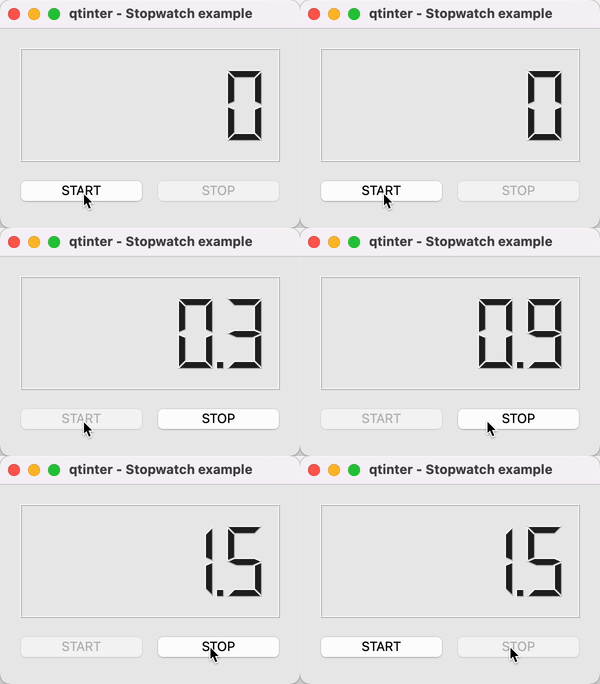
This sample application has a START button, a STOP button and an
LCD display to display the time elapsed. The ‘core’ of the app
is a coroutine (_tick) that updates the LCD display constantly:
async def _tick(self):
    t0 = time.time()
    while True:
        t = time.time()
        self.lcdNumber.display(format(t - t0, ".1f"))
        await asyncio.sleep(0.05)
The steps of the pattern are implemented as follows:
Code the stopwatch logic in a coroutine function (
_start) and connect it to the START button by wrapping it withasyncslot().On entry, store the running
asyncio.Taskinstance for cancellation later, and update the UI states. Before exit, restore the UI states, and reset the task instance to break the reference cycle.def __init__(self): ... self.startButton.clicked.connect(qtinter.asyncslot(self._start)) ... async def _start(self): self.task = asyncio.current_task() self.startButton.setEnabled(False) self.stopButton.setEnabled(True) try: await self._tick() finally: self.startButton.setEnabled(True) self.stopButton.setEnabled(False) self.task = None
Connect the STOP button to a plain slot (
_stop) that cancels the running task.def __init__(self): ... self.stopButton.clicked.connect(self._stop) ... def _stop(self): self.task.cancel()
Cancel the running task (if one exists) when the widget is closed.
def closeEvent(self, event):
    if self.task is not None:
        self.task.cancel()
    event.accept()
Always cancel a task when it is no longer needed.
asyncslot() keeps a strong reference to all running tasks
it starts. If you don’t cancel a task explicitly, the task will
keep running until using_asyncio_from_qt() exits.
Remark. It is possible to decorate a coroutine function with
asyncslot and connect the decorated function directly
to a Qt signal. However, this approach is not recommended because
a decorated coroutine function is transformed into a regular function,
which brings subtle semantic differences and causes confusion.
Note
asyncslot() makes two extensions to asyncio’s semantics
in order to work smoothly:
Eager task execution. The first “step” of a task created by
asyncslot()is executed immediately rather than scheduled for later execution. This extension supports a common pattern where some code must be executed immediately in response to a signal, such as updating UI states in the above example.Nested task execution. If a coroutine function wrapped by
asyncslot()is called from a coroutine (e.g. as the result of a signal being emitted), the calling task is “suspended” when the call begins and “resumed” after the call returns. This extension makesasyncslot()easier to use in a number of scenarios.
For details on these semantic extensions, see Eager execution.
If you prefer to stick to asyncio’s API and semantics, it is perfectly
possible and supported to schedule coroutines without using
asyncslot(). Reusing the Stopwatch example above,
the key steps are:
Connect the START button to a plain slot (
_start). In this slot, update the UI states, schedule the coroutine usingasyncio.create_task(), and hook the task’s “done callback” to a clean-up routine (_stopped) to restore the UI states and reset the reference to the task.def __init__(self): ... self.startButton.clicked.connect(self._start) ... def _start(self): self.startButton.setEnabled(False) self.stopButton.setEnabled(True) self.task = asyncio.create_task(self._tick()) self.task.add_done_callback(self._stopped) def _stopped(self, task: asyncio.Task): self.startButton.setEnabled(True) self.stopButton.setEnabled(False) self.task = None
Note
Code that disables the START button cannot be moved into
_tick(), because it must be executed immediately when the button is clicked.Consequently, code that restores the UI states cannot be moved into
_tick(), because the task might be cancelled before it starts running.(Same as before) Connect the STOP button to a plain slot (
_stop) to cancel the running task.def __init__(self): ... self.stopButton.clicked.connect(self._stop) ... def _stop(self): self.task.cancel()
(Same as before) Cancel the running task (if one exists) when the widget is closed.
def closeEvent(self, event):
    if self.task is not None:
        self.task.cancel()
    event.accept()
Again, always cancel a task when it is no longer needed.
Otherwise the task may keep running in the background until
using_asyncio_from_qt() exits (or gets garbage-collected
at an arbitrary point).